
‘Obtaining data from the system is easy to do and comes off in a format that makes it simple to upload to our central CRM database.’
REPORTED · Howden Insurance · Associate Director · Case study
CRM enrichment
You enrich HubSpot or Salesforce with Companies House data in two moves. Match each account to its UK company number. Then update the fields you choose from the register and the filed accounts, on a schedule. ZINT Platform does both, for HubSpot, Salesforce, Microsoft Dynamics 365, Zoho CRM and Pipedrive.
Evidence for the plan.
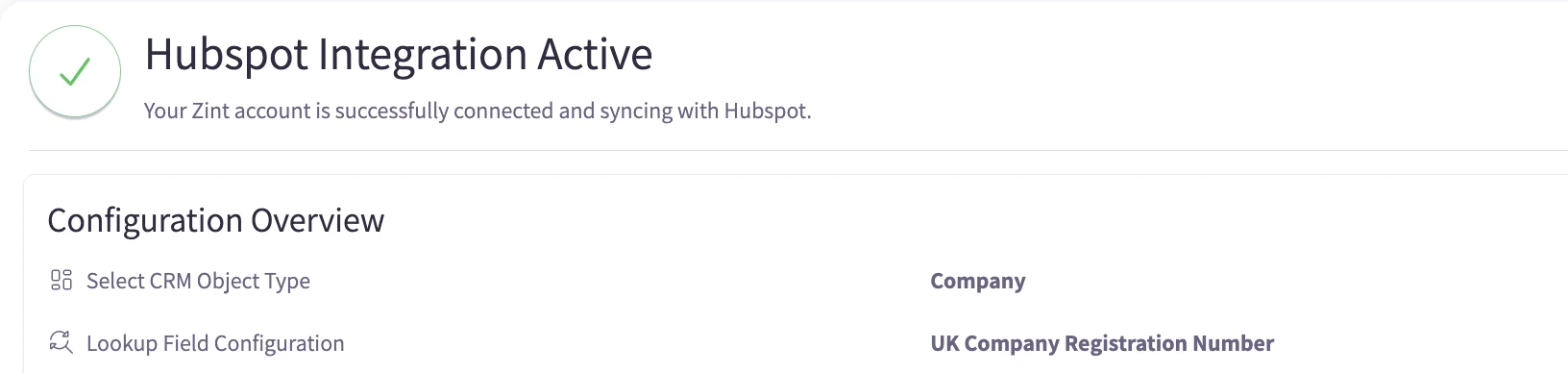
PUBLISHED · ZINT · HubSpot integration screen
Most CRM records start as a company name and a website. Enrichment matches each one to its UK company number, fills the fields your team sells from, and keeps them current.
PUBLISHED · ZINT · CRM integration guide · May 2026
| Before enrichment | After enrichment |
|---|---|
| A company name and a website, typed in by a seller | The UK company number, matched once, so every update lands on the right record |
| Revenue, if someone looked it up | Revenue, SIC code and other facts read from the register and the filed accounts |
| No view of fit, and facts that go stale | Magic Insights answers and a propensity score, kept current by a daily run |
Your sellers open each account with the facts already in place. Nothing they typed is overwritten unless you choose.
A daily run updates every matched record. You choose, field by field, whether ZINT overwrites or only fills blanks.
Push a company from ZINT into your CRM. ZINT checks for an existing record first. You see which companies were found and which were missing, then choose to update or create.
A daily run pulls fields such as account owner into ZINT. That lets you search the market with your own accounts excluded.
HubSpot, Salesforce, Microsoft Dynamics 365, Zoho CRM and Pipedrive.
ZINT matches your records to UK company numbers, refreshes matched records every day and checks for an existing record before it creates a new one.
Your super user connects the CRM, picks the record type and maps the company number field. Then each ZINT field is mapped to a CRM field. A test export of five companies checks the set-up before anything runs.
Many teams add separate fields, such as ‘ZINT annual revenue’. Nothing a seller typed is then overwritten.
ZINT will never sell your data to third parties. It is used only to deliver Import, Export and Enrich.
PUBLISHED · ZINT · CRM integration guide · May 2026
Run your questions across a list, then push the answers into CRM fields. Marketing can segment on them, and sales can open with them.
A logistics customer pre-qualified a customs consultancy campaign this way and pushed the results to HubSpot.
REPORTED · UK logistics firm · Customer call
A UK bank’s team described its process to us.
‘There’s obviously that gap between someone identifying a good, a hot lead on ZINT, and then us putting it into CRM.’
REPORTED · UK bank · Sales call
The team’s process
With Export, Enrich and Import
The three parts close that gap.
| Stage | What happens | What you leave with |
|---|---|---|
| 2 Data testing | The two-way data map is tested with your super user and your CRM owner. Duplicates are removed | A tested two-way data map between ZINT and your CRM |
| 5 Territories and workflows | The CRM sync goes live | Live territories in your CRM, each with an owner |
| After go-live | Enrichment and tracking of target accounts, on request | Records that stay current |
PUBLISHED · ZINT · Customer Success Plan · Oct 2026
One enrichment credit syncs one company record to your CRM and keeps it updated for 12 months.
PUBLISHED · ZINT · Credit definitions · Q4 2026 price list
Each result below was reported by the customer.
‘Obtaining data from the system is easy to do and comes off in a format that makes it simple to upload to our central CRM database.’
REPORTED · Howden Insurance · Associate Director · Case study

‘ZINT’s Salesforce integration has provided us a clear way of visualising our white space and re-engaging our latent pipeline in a highly effective way.’
REPORTED · DPD UK · Case study
An R&D tax advisory firm
‘I like the fact that it is controlled around company number, because it means it avoids salespeople going nice and random and rogue, and putting those terrible data into our CRM.’
REPORTED · R&D tax advisory firm · Customer call
It is the only key ZINT matches on. If the field is empty, a matching project comes first.
If your CRM holds D-U-N-S numbers and no company numbers, the company number has to be added before anything syncs.
Where one company has two records, ZINT cannot choose between them. Make the company number field unique.
ZINT syncs with one type of CRM record, usually Company in HubSpot or Account in Salesforce.
A new filing reaches your CRM at the next daily run, once ZINT has read it. Export happens when you ask for it.
A Magic Insights answer lands in the CRM field as the answer only. Its reasoning and its sources stay on the company’s profile in ZINT.
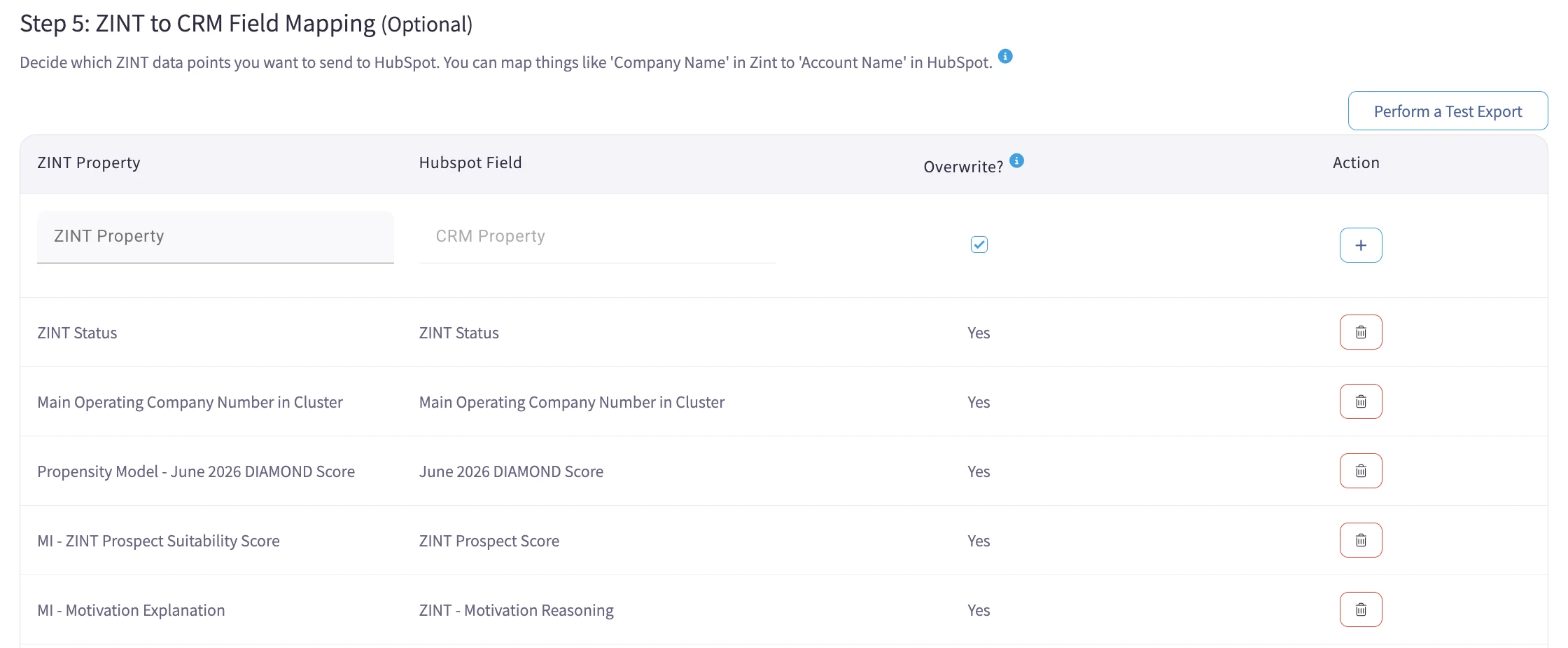
PUBLISHED · ZINT · HubSpot integration screen
Match each account to its UK company number, then update the fields you choose on a schedule. ZINT does both for HubSpot, Salesforce, Microsoft Dynamics 365, Zoho CRM and Pipedrive. It also adds figures read from each company’s filed accounts.
HubSpot, Salesforce, Microsoft Dynamics 365, Zoho CRM and Pipedrive. ZINT matches your records to UK company numbers, refreshes matched records every day and checks for an existing record before it creates a new one.
ZINT can run a matching project first. It works from the company name, any company number you hold, the website, the switchboard number and the address.
Only where you allow it. For each field, you choose whether ZINT overwrites or only fills blanks. Many teams add separate ZINT fields.
Enrich and import both run every day. Export happens when a user asks for it.
Company facts such as revenue and SIC code, your own custom fields, Magic Insights answers and propensity scores.
ZINT will never sell your data to third parties. It is used only to deliver Import, Export and Enrich.
One enrichment credit syncs one company record to your CRM and keeps it updated for 12 months.
No. ZINT does not sell personal contact data. It shows you which companies to approach, and why. A company profile carries the directors on the register and the company’s published phone number, website and social media links. Where a company’s website publishes its directors’ social media profiles, ZINT shows those too. For direct emails and mobile numbers, teams pair ZINT with a contact tool. Our partners provide contact details.
No. ZINT covers the UK only: every active company on the Companies House register, in depth.
You can start free with a work email. Team packages are priced on application, and the pricing page sets out what drives the price.
Tell us what you sell and to whom. In a 20-minute call, we will show you how many UK companies fit, which ones lead the list, and the filing behind each.