ZINT Modes

Evidence for the call.

A ZINT Mode is a view of ZINT built for one trade. It shows a rep or broker which UK companies to call today, and why, in that trade’s own words. There are five: Finance Mode, Logistics Mode, Tax Mode, Energy Mode and Insurance Mode.
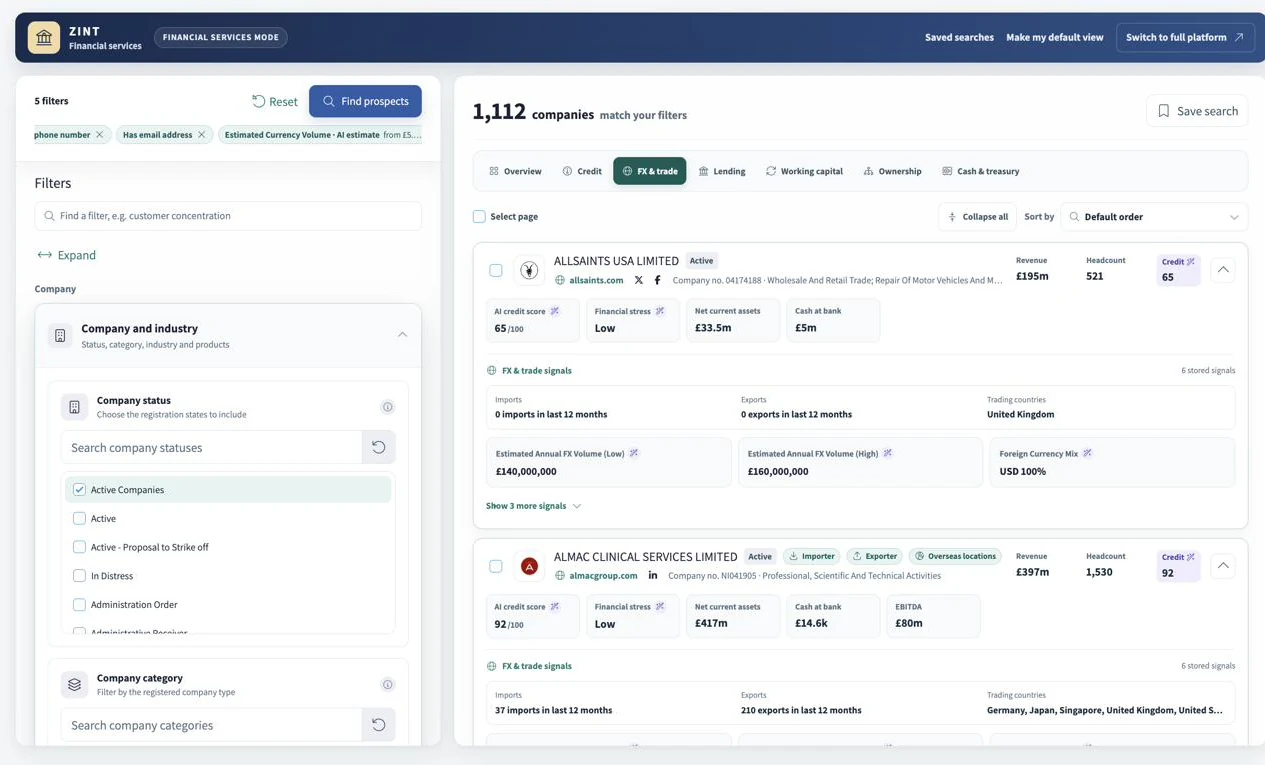
Finance Mode results: 1,112 companies match the filters, with AllSaints USA and Almac Clinical Services showing credit, FX and trade signals

PUBLISHED · ZINT · Finance Mode screen
Search, shortlist, call.

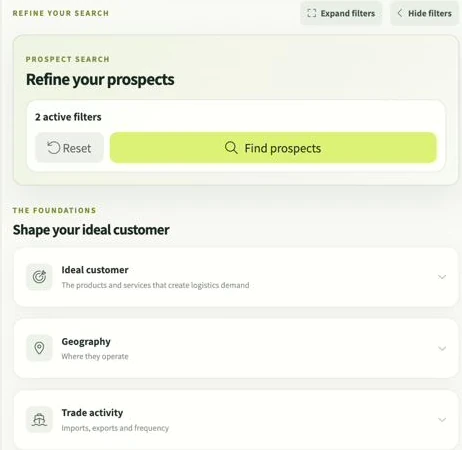
Logistics Mode search: two active filters, then filters grouped as ideal customer, geography and trade activity

Search

Filters in your trade’s words. In Logistics Mode you can describe a niche in plain English, such as ‘subscription dog food brands’.

PUBLISHED · ZINT · Logistics Mode screen

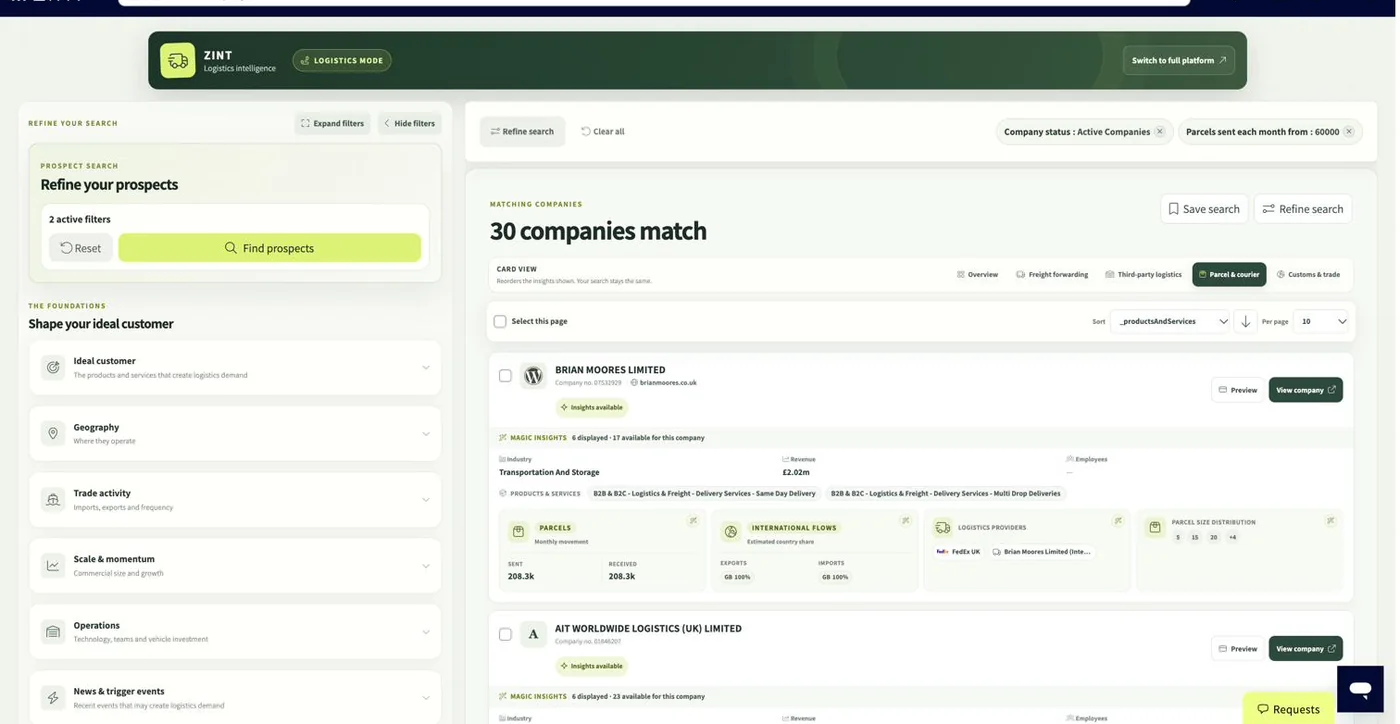
Logistics Mode results: companies matching the search, each card showing parcels, international flows and logistics providers

Results

A count of matches, then a card for each company. Views re-order the same results for what you sell.

PUBLISHED · ZINT · Logistics Mode screen

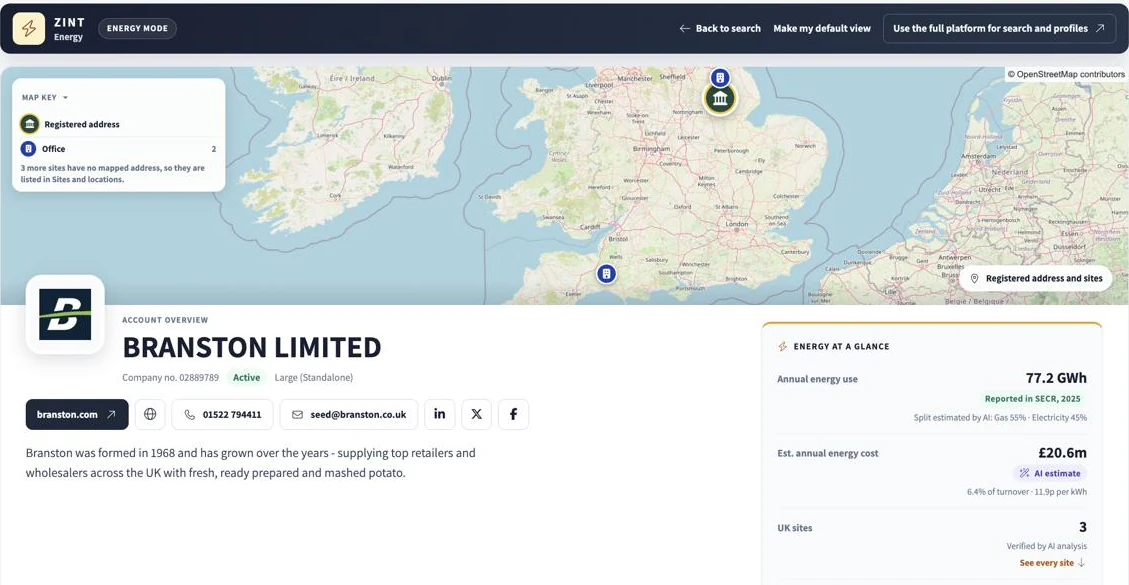
The Energy Mode profile for Branston Limited, with its sites on a map and energy at a glance

Profile

The company’s website, published phone number and social media links, then the filed figures, then the signals that qualify it. Each signal links to its evidence.

PUBLISHED · ZINT · Energy Mode screen · Branston Limited, Co. 02889789

764

One search in Logistics Mode: active manufacturers in the West Midlands sending 200 or more parcels a month. 764 companies matched.

MODELLED · ZINT · Logistics Mode search · 26 Oct 2026 · Parcel volumes are AI estimates

Five Modes, named for the trade.

ModeBuilt forLeads withViewsSector page
Finance ModeLenders and banks, FX and payments, trade financeFiled figures laid out like a P&L, credit and stress signals, FX flows and currency exposure, known financial relationshipsOverview, Credit, FX and tradeFinancial services
Logistics ModeFreight forwarders, parcel and courier, pallet networks, third-party logistics, customsImport and export activity, trading locations on a map, shipping signalsOverview, Freight forwarding, Third-party logistics, Parcel and courier, Customs and tradeLogistics
Tax ModeR&D tax, capital allowances, accountancy firmsThe filed financial report laid out like the accounts, R&D and grant signals, property and energy figuresR&D and innovation, Capital allowances, Accounts and audit, Energy tax, International taxTax advisory
Energy ModeSuppliers, brokers, compliance and carbon, renewables, fuels and fleetAnnual kWh with its source, sites, likely renewal, net zero intent, ESOS and SECR scopeEnergy supply, Brokers and procurement, Compliance and carbon, Renewables and storage, Fuels and fleetEnergy
Insurance ModeCommercial lines brokers selling direct to businessesThe rating basis of turnover, wage roll and headcount, exposure by line of cover with an estimated limit or sum insured, review triggers and incidentsCommercial combined, Liability and contractors, Motor fleet, Property and interruption, Cyber and professional lines, Trade credit and cargoInsurance

PUBLISHED · ZINT · Mode contents · Product screens and build records

Every figure says where it came from.

A Mode labels each figure. ‘Recorded’ means it came from a filing or a public register. ‘AI estimate’ means ZINT worked it out from what the company files and publishes. Each estimate shows a confidence figure and links to its evidence.

Where the evidence is thin, the answer stays blank. Where a figure looks implausible, the Mode greys it out and says why.

Tax Mode even says what a date is not: ‘These are accounts dates, not tax filing or claim deadlines.’

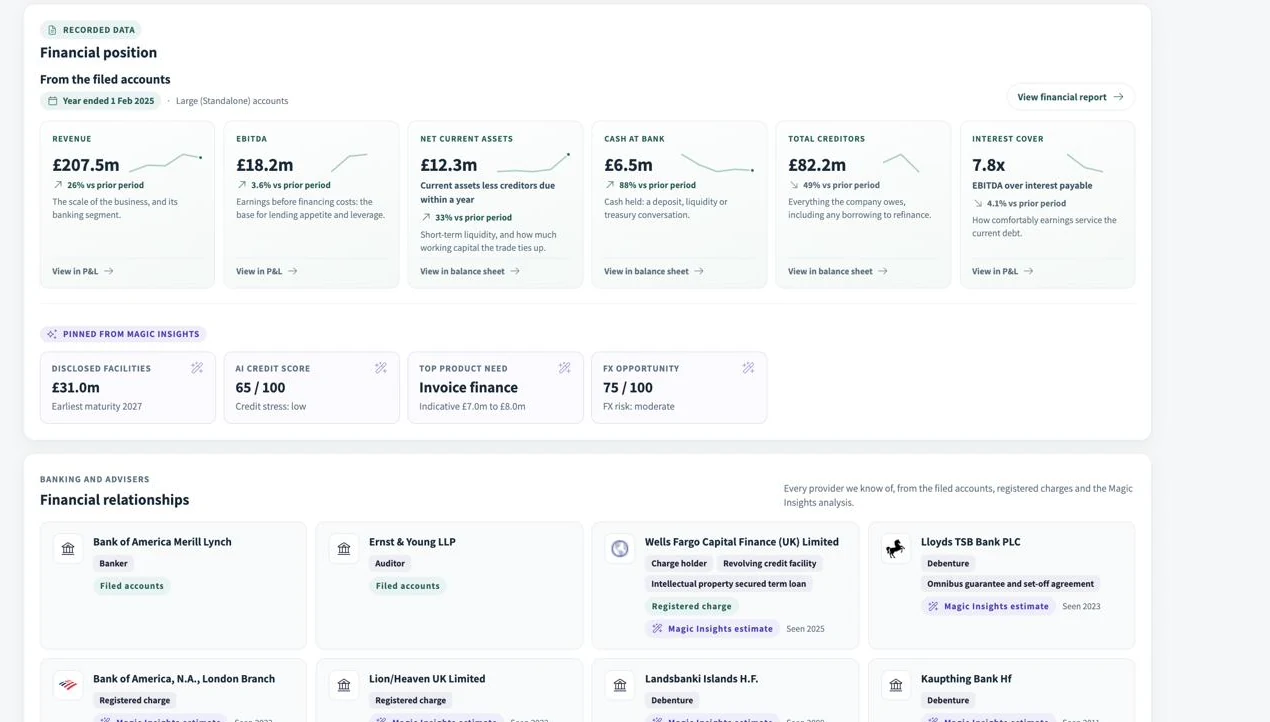
A Finance Mode profile: the financial position from the filed accounts, labelled recorded data, with figures pinned from Magic Insights labelled apart below

1 · ‘Recorded data’, from the filed accounts
2 · ‘Pinned from Magic Insights’, labelled apart

PUBLISHED · ZINT · Finance Mode screen
Ready for the call.

Open a profile before you dial. You see what the company sells, its latest filed figures, the group it sits in, its recent news and the signals for your trade.

An insurance broker told us:

‘What would have taken a day’s worth of prep, now you could probably do it in the car or in the car park, on the system.’

REPORTED · Insurance broker · Customer call

The profile shows the company’s published phone number and its social media links. For direct dials, teams pair ZINT with a contact tool. Our partners provide contact details.

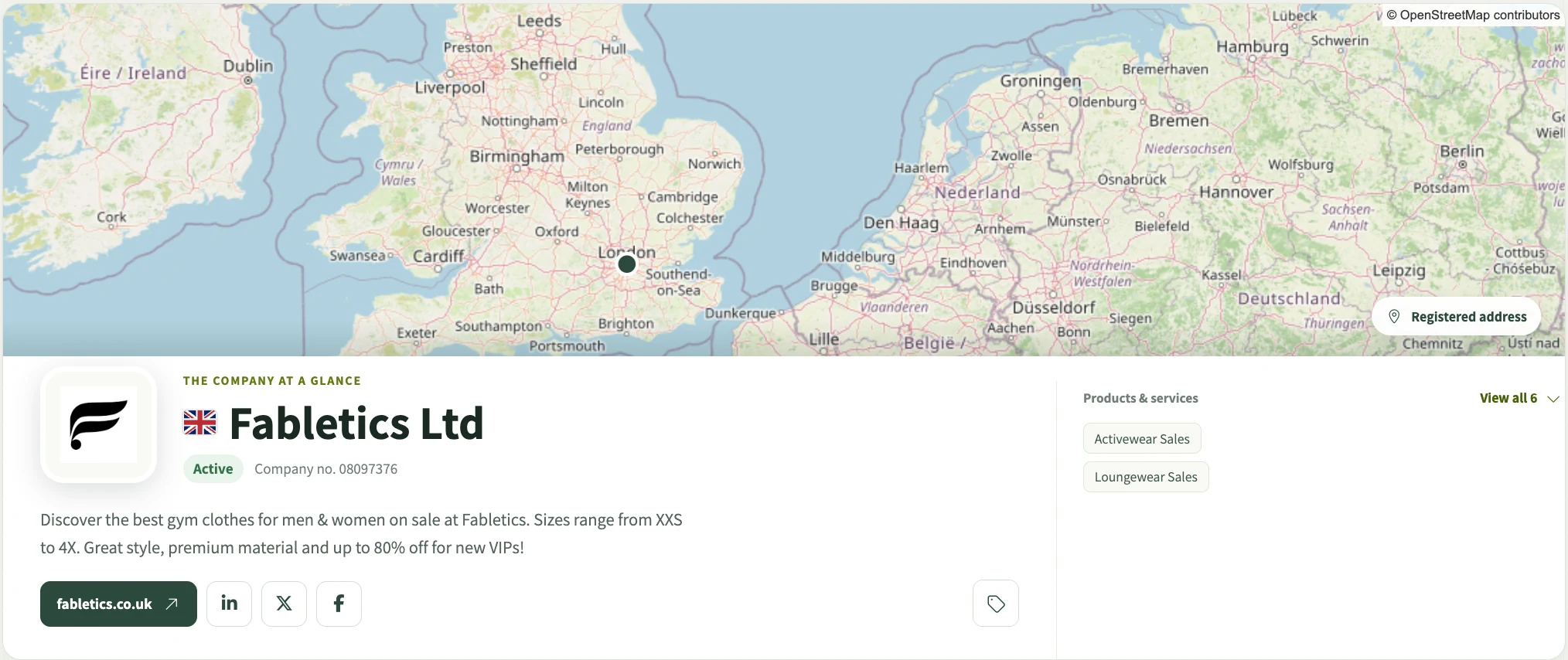
A Logistics Mode profile for Fabletics Ltd, with its registered address on a map, what it sells, and its website and social links

PUBLISHED · ZINT · Logistics Mode screen

A Mode is a view. You can leave it.

A Mode sits on ZINT Platform and reads the same evidence. You can set a Mode as your default view, or switch to the full Platform when you need every filter. Views inside a Mode re-order the same results for what you sell.

See ZINT Platform

Start free.

Free for one user, with no end date. Each month you get 25 company views in the Modes, 25 Magic Insights credits, 25 exports, 25 enrichment credits and 25 tracking credits. You need a work email to register.

When the Platform suits you better.

Your trade has no Mode yet
Use ZINT Platform. It covers every active UK company, whatever you sell.
You plan territories or model a market
That is ZINT Platform’s job. A Mode is built for choosing the next call.

Questions about Modes.

What is a ZINT Mode?

A ZINT Mode is a view of ZINT built for one trade. It shows which UK companies to call today, and why, in that trade’s own words.

Which Modes are there?

Five: Finance Mode, Logistics Mode, Tax Mode, Energy Mode and Insurance Mode.

Is a Mode a separate product from ZINT Platform?

A Mode is a view of ZINT Platform, so both read the same evidence. You can switch between them.

What do ‘Recorded’ and ‘AI estimate’ mean?

‘Recorded’ means the figure came from a filing or a public register. ‘AI estimate’ means ZINT worked it out, and it shows a confidence figure and its evidence.

Can I use a Mode for free?

Yes. Free for one user, with no end date. Each month you get 25 company views in the Modes, 25 Magic Insights credits, 25 exports, 25 enrichment credits and 25 tracking credits. Search results and company pages count together. You need a work email.

Does ZINT give me contact details?

No. ZINT does not sell personal contact data. It shows you which companies to approach, and why. A company profile carries the directors on the register and the company’s published phone number, website and social media links. Where a company’s website publishes its directors’ social media profiles, ZINT shows those too. For direct emails and mobile numbers, teams pair ZINT with a contact tool. Our partners provide contact details.

Does ZINT cover companies outside the UK?

No. ZINT covers the UK only: every active company on the Companies House register, in depth.

What does ZINT cost?

You can start free with a work email. Team packages are priced on application, and the pricing page sets out what drives the price.

Open the Mode for your trade.

Register with a work email and pick your Mode. A free account has no end date.

G2 High Performer badge, Fall 2026G2 Momentum Leader badge, Fall 2026G2 High Performer badge, United Kingdom, Fall 2026G2 High Performer badge, Small Business, United Kingdom, Winter 2026G2 Users Love Us badge

Rated 4.8 out of 5 on G2.

PUBLISHED · Source: G2.com, Inc. · Star rating and badges